Quick Answer
What pencil grip reduces hand fatigue?
There is no single proven fatigue-preventing grip. Keep a grip that lets you write comfortably and legibly without sustained pinching. If discomfort appears, test less pressure, a wider or smoother-flowing pen, forearm support, and shorter writing blocks.
Why Does Handwriting Cause Fatigue?
Handwriting can feel tiring for more than one reason: sustained pressure, pen resistance, paper position, posture, pace, and session length can all affect comfort. A wrapped thumb or firm grip is not automatically a problem; the useful question is whether the writer can complete the task comfortably and legibly.
Occupational therapy research does not support the idea that only one exact named grip works well. Studies of Grade 4 students found similar speed and legibility across several mature grasp patterns. Because those studies involved children and did not test adult pain treatment, use them to avoid enforcing one visual pose—not to promise that a particular grip will prevent fatigue[Schwellnus et al., 2012] [Koziatek & Powell, 2003].
Grip Pattern Comparison
| Grip Architecture | Functional Check | Evidence Boundary | Practical Next Step |
|---|---|---|---|
| Dynamic Tripod | Writing is comfortable, controlled, and legible for the required task. | Not shown to outperform other mature grasps in the cited child samples. | One mature option |
| Lateral Tripod | The writer can guide the pen without discomfort or loss of control. | Also performed functionally in the cited fourth-grade samples. | Check comfort |
| Any uncomfortable grasp | Pain, fatigue, or task completion is a concern. | A visual grip category alone cannot identify the cause. | Review function |
How do you set up a more ergonomic grip?
If you are trying to reduce fatigue, start with a calm setup instead of forcing your fingers into a perfect pose. These steps are options to test, not a clinical protocol or a requirement for every adult or child.
- Support the pen where it feels stable without clamping it tightly.
- Guide the shaft lightly and check whether the thumb or fingers are pinching.
- Hold the pencil far enough from the tip that you can still see the writing line comfortably.
- Support the forearm and test a paper angle that keeps the writing line visible and the wrist comfortable.
- Test pressure by writing a short line of loops. If your knuckles whiten or the paper dents deeply, release pressure and restart more slowly.
- Use short comparison blocks before adding speed or a longer task.
How Can You Test Your Grip Pressure?
Before changing the grip, make a short sample under normal conditions. The self-check below can reveal signs of high pressure, but it cannot diagnose pain, fatigue, or the cause of uneven writing.
Pressure Test Protocol
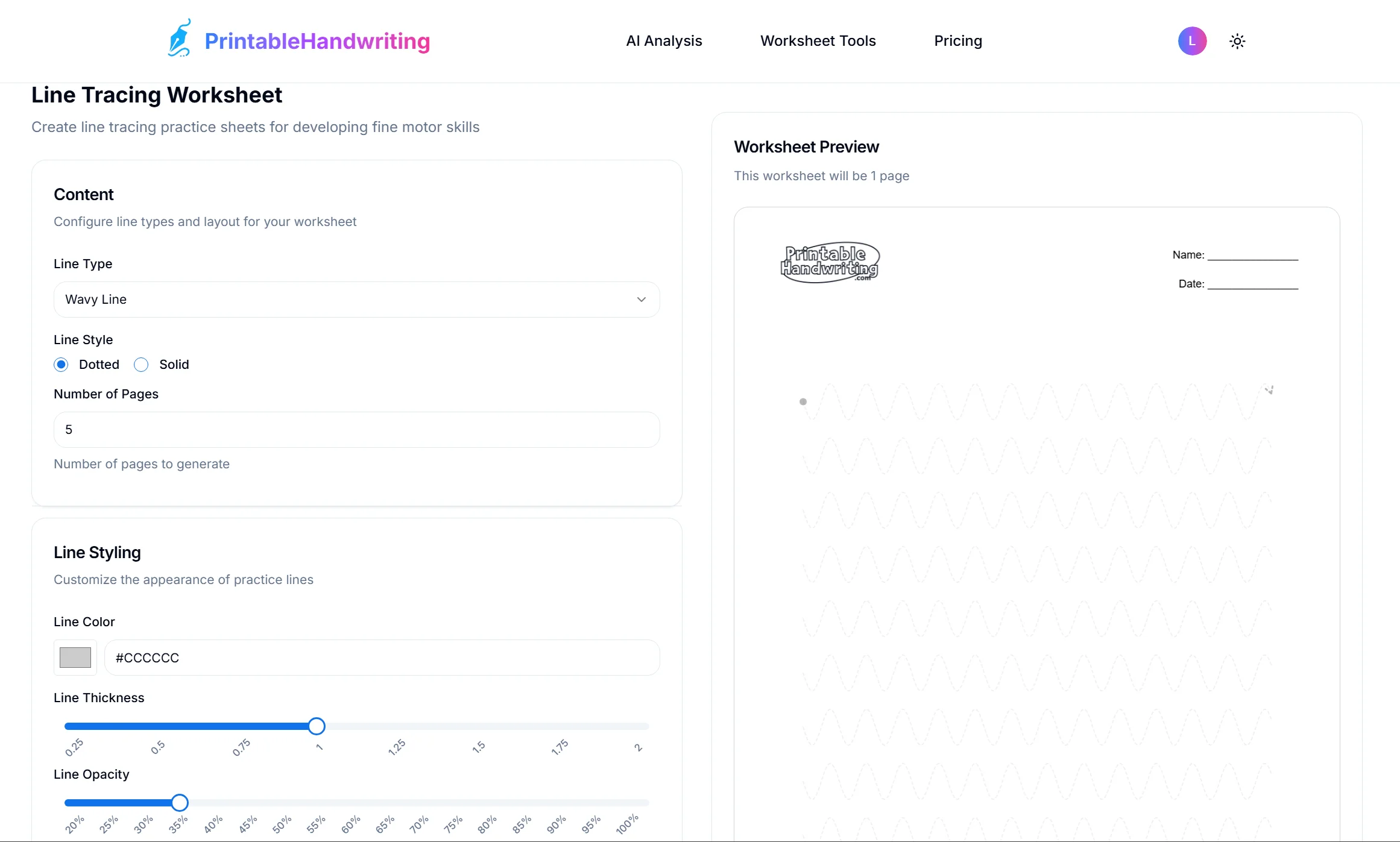
- Open a line-tracing practice sheet (use the Line Worksheet Generator from the practice links at the end of this article).
- Configure parameters for stress testing:
- Line Type: Select "Wavy Line". (Continuous curves expose rigid wrists)
- Line Style: Dashed. (Easier to spot deviations)
- Line Color: Light Gray #CCCCCC.
- Print and trace. If the paper indents deeply or your knuckles whiten, record that observation and repeat the line with less pressure. Compare comfort and control instead of assigning a pass/fail result.
What Are Common Grip Errors and How Do You Fix Them?
A new grip can feel unfamiliar at first. Treat the options below as comfort experiments; there is no single correct posture that every writer needs to copy.
Pattern: The "Thumb Wrap"
The thumb crosses over the index finger. If the writing remains comfortable, controlled, and legible, the visual pattern alone is not a reason to force a change.
Pattern: The "Hooked Wrist"
The wrist curls inward, sometimes to improve visibility of the writing line. This position may feel restrictive for some writers, but it does not prove the cause of fatigue.
How Do You Test a Grip Adjustment Over Time?
If you decide to test a grip adjustment, use the optional 7-day schedule below to compare comfort and control. Seven days is a convenient observation window, not a guaranteed correction timeline.
| Day | Focus Module | Generator Settings |
|---|---|---|
| Day 1-2 | Pressure Comparison | Tool: Line Generator Setting: Line Type: Clockwise Oval |
| Day 3-4 | Repeated Strokes | Tool: Print Generator Setting: Pattern: "llll iiiii" |
| Day 5-7 | Shape Comparison | Tool: Cursive Generator Setting: Word: "minimum" / Opacity 50% |
How Does Pen Choice Affect Writing Comfort?
If writing still feels uncomfortable after a setup change, compare the pen itself. A thin or resistant pen may prompt some writers to press harder; a wider barrel or smoother-flowing ink may reduce the force needed.
- Barrel feel: Compare a thin pen with a wider barrel and record whether either changes pinch pressure or comfort.
- Weight balance: Compare a lighter and heavier pen over the same short writing task.
- Ink flow: If a pen skips unless you press hard, compare a smoother-flowing pen before assuming your grip is the whole problem.
Limitations
Grip advice is useful, but it does not explain every case of fatigue.
- Fatigue may relate to pace, posture, paper angle, desk setup, or other factors rather than grip alone.
- Stop a writing session if it causes pain, tingling, numbness, weakness, or worsening symptoms. Seek qualified medical advice when symptoms persist or worsen; an occupational therapist may be one part of the assessment or support plan.
- Several mature grips can be functional, so the goal is less tension and better control, not visual perfection.
- If a change feels awkward, compare comfort and task performance before deciding whether to keep it.
Put the grip changes into practice
Use a few low-pressure drills to test whether the new grip actually feels easier. Start with lines and loops, then move to short print practice if the setup remains comfortable.
Frequently asked questions
What pencil grip reduces hand fatigue?
No single named grip has been shown to prevent fatigue for everyone. Keep a grip that is comfortable, functional, and legible; if you notice pinching or discomfort, try less pressure, a wider pen, a supported forearm, or a shorter writing block.
Sources & References
In 120 Grade 4 students, four mature grasp patterns performed similarly before and after a 10-minute copy task. This does not establish the best grip or fatigue treatment for adults.
In 74 Grade 4 students, thumb position affected measured forces but the differences had no observed bearing on speed or legibility. This was not an adult pain study.
Found similar cursive speed across common grasp patterns in fourth-graders and supports judging function rather than enforcing one visual pose.
Reviews school-age handwriting interventions. It does not validate a specific grip correction or adult fatigue protocol.
Lists pain, weakness, tingling, numbness, cramps, and swelling as possible symptoms and advises medical review when symptoms persist or worsen.
Suggests breaking writing into smaller blocks, avoiding overly tight grips, and trying wider or lower-friction pens to reduce hand force.