Quick Answer
How do I improve my signature?
Your signature is the highest-ROI handwriting skill because you write it thousands of times in your lifetime. To redesign it: (1) analyze your current signature's weakest letter forms, (2) practice the new version 50+ times daily for 2 weeks to overwrite motor memory, (3) gradually increase speed while maintaining the new form.
Why is your signature the highest ROI writing task you do daily?
In systems engineering, the value of optimizing a task depends on its Execution Frequency and Lifecycle. Let's categorize our daily analog writing into two buckets: Body Text and Signatures.
| Metrics | Body Text (Notes, Exams) | Signature (Contracts, IDs) | Optimization ROI |
|---|---|---|---|
| Execution Frequency | Medium (Decreasing) | Extremely High (Daily/Weekly) | Signature Wins |
| Fault Tolerance | Low (Requires 100% legibility) | High (Allows heavy abstraction) | Massive Space |
| Reusability | Zero (Unique content) | 100% (Exact same string) | Absolute Dominance |
The Conclusion: It takes months of systemic training to overhaul your general handwriting. However, refactoring a 2-3 word name only takes a few days of precise iteration. It is the "Hello World" of your professional physical output.
Why do people with decent handwriting often have amateurish signatures?
Why do people with otherwise decent handwriting often possess rigid, amateurish signatures? Because they are using the wrong rendering engine.
In cognitive science, standard word-by-word writing relies on Closed-loop Control. Your eyes watch the pen tip, and your brain constantly evaluates whether each letter's geometry is correct. This is a high-latency processing method.
A mature, professional signature runs on Open-loop Control. It relies on a core concept in neuroscience known as Motor Chunking.
- Amateur Signature (Parsing char by char):
A→ Pause →l→ Pause →e→ Pause... (System lag, shaky lines). - Expert Signature (Macro Execution): The brain issues a single command:
[Execute_Alexander_Signature]. The muscles release a continuous kinematic flow at high speed, requiring zero real-time visual feedback.
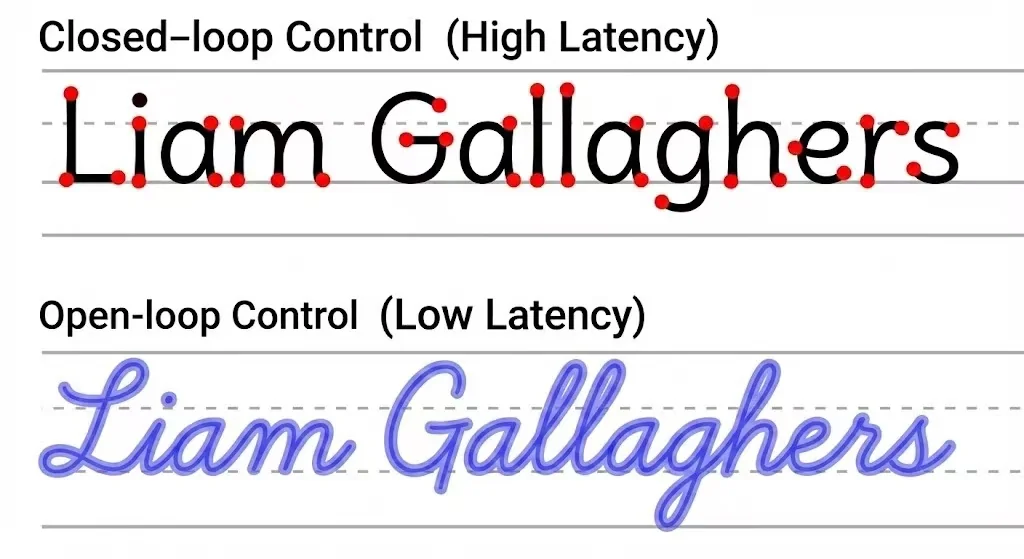
This is exactly why you cannot practice a signature "stroke by stroke." You are not striving for geometric precision; you are striving for a high-velocity kinematic flow.
How do you deploy your signature macro for professional results?
Since a signature is a biomechanical macro, we must train it like a neural network—through high-frequency, low-latency repetition to strengthen synaptic connections. This exact engineering problem is why we built the Name Tracing Generator.
Pathfinding (Dimensionality Reduction)
Do not design overly complex patterns. A highly efficient professional signature consists of: Crisp capital initials + a fluid, abstracted lowercase tail. Abandon the rigid "Print" mindset. Map out optimal connection paths mentally, or use our Cursive Generator to visualize ergonomic ligatures.
Dataset Generation
Open the Name Tracing Generator and input your name. If you want a more compact, aggressive visual impact, decrease the Letter Spacing slightly to force overlap at the connection nodes.
Velocity Overload Training
This is the critical phase. When tracing your generated worksheets, absolutely do not trace slowly just to stay inside the guide lines.
- Relax your forearm (do not isolate movement to your wrist).
- Execute the movement at 1.5x your normal writing speed, "gliding" over the trajectory.
- Allow for a margin of error. Internalize the Friction Physics, don't just photocopy.
How do you compile and deploy your signature macro?
In a corporate environment, a fluid, decisive signature (even if highly abstract) transmits a signal of confidence and high processing speed. Conversely, a shaky, slow, overly-neat signature signals hesitation and a lack of muscle familiarity.
Stop running buggy code for your most frequently called function. Build your customized dataset and engineer your "Hello World" to perfection with the Name Tracing Generator.
Frequently asked questions
How do I improve my signature?
Your signature is the highest-ROI handwriting skill because you write it thousands of times in your lifetime. To redesign it: (1) analyze your current signature's weakest letter forms, (2) practice the new version 50+ times daily for 2 weeks to overwrite motor memory, (3) gradually increase speed while maintaining the new form.
Sources & References
Demonstrates that long motor sequences are learned as chunks—the neuroscience basis for treating a signature as one executable “macro.”
Framework for internal models and open- vs closed-loop motor control, matching the article’s closed-loop tracing vs open-loop signature execution contrast.
Shows complex continuous skills benefit from whole-task practice conditions—supporting high-speed whole-signature repetition over stroke-by-stroke drilling.