Quick Answer
Should I learn print or cursive first?
Print first, then cursive. Print builds discrete letter coordinates with calibration pauses; cursive removes those pauses. Without stable print structure, continuous joins usually compound errors instead of creating flow.
Why is print the prerequisite for cursive?
Many beginners fall into a logical trap: “My print handwriting looks childish, so I will learn cursive to hide it.”
This is incorrect. Cursive is simply Print played on “Hard Mode.”
- Print (Discrete System): Every letter is a separate module. When you finish a letter, you lift the pen. This Micro-pause is crucial—it is an event where your brain performs “Auto-Calibration,” resetting coordinates for the next character.
- Cursive (Continuous Flow System): You remove the lift-off calibration. You must execute a complex string of vectors without any reference points.
If your muscle memory hasn't established absolute coordinates via Print, your cursive will drift. You aren't creating flow; you are compounding errors.
Before choosing your branch, you can run a quick handwriting evaluation to see whether your current bottleneck is structure, spacing, or slant.
What is the print stage and why does it matter?
Objective: Accuracy > Speed. Establish immovable Anchor Points.
In this phase, ignore style. Focus entirely on the Geometry. You need to verify that your 'a' closes perfectly and your 'h' stands vertically.
Recommended Tool: Edu SA Hand
Available in the Print Generator (open counters, zero slant for beginners).
How does the bridge protocol work?
Jumping from basic print to Allura is too big a gap. You need middleware.
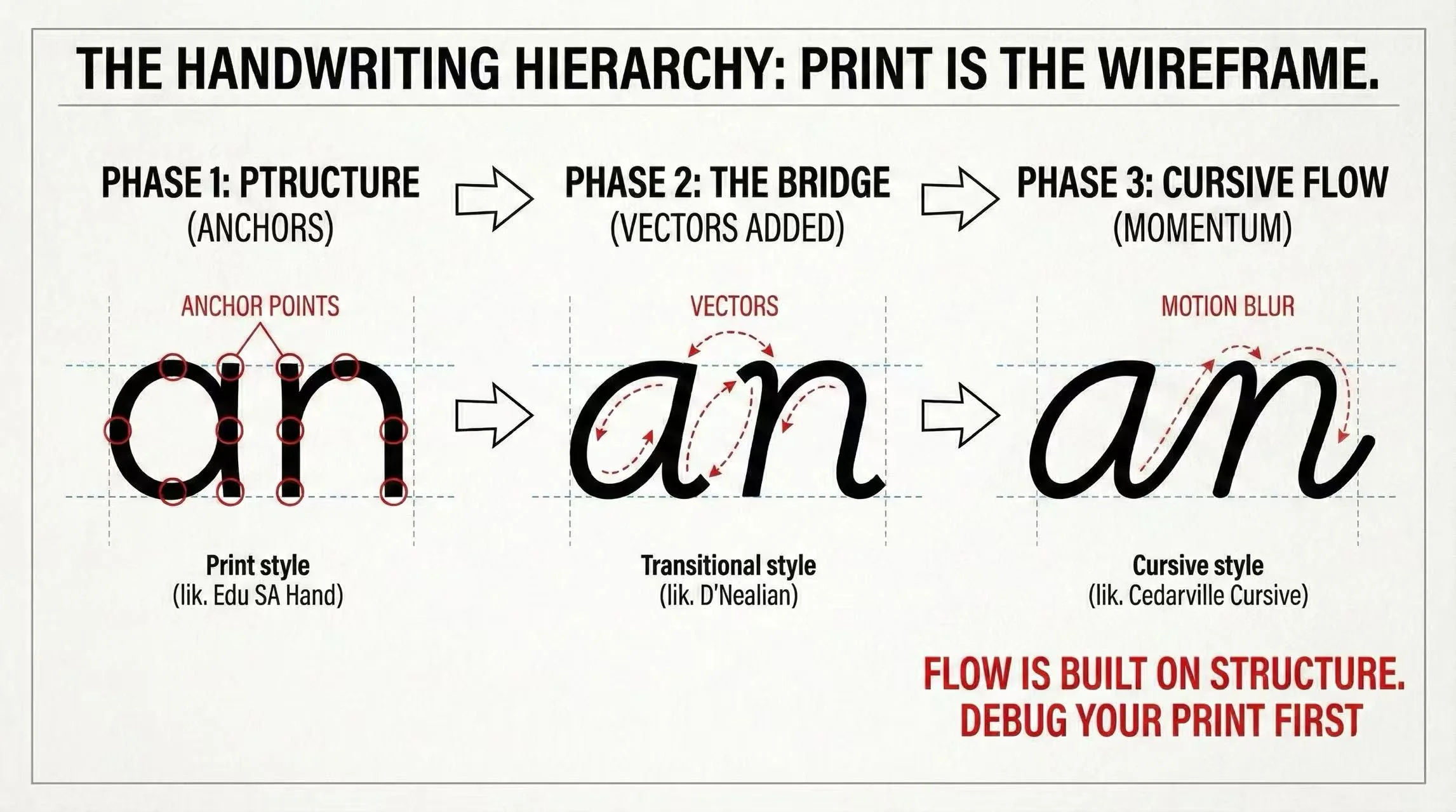
Recommended Tool: Playwrite AU SA
The Engineering Logic: A transitional connected script introduces slant and join rhythm without demanding the full speed and compression of ornate cursive. It is a safer bridge once print structure is stable.
Available in the Cursive Generator.
What comes after print structure is stable?
Once your print letters keep consistent size, baseline, and closed counters, you can add joins. That is a practice-stage change—not a claim that cursive is always faster or always better for every workplace task.
- Need speed/legibility numbers? Cursive vs print speed and legibility benchmark
- Need a scenario pick (notes, exams, workplace)? Which handwriting style should you practice
Which font should I start with?
Based on your current skill level, here is the recommended starting font:
| User Status | Pain Point | Recommended Font |
|---|---|---|
| Newbie | Shaky lines, inconsistent sizing | Edu SA Hand |
| Intermediate | Want to connect, but looks messy | Playwrite AU SA |
| Pro | Need speed for notes | Cedarville Cursive |
Start practicing with Edu SA Hand using the Print Generator.
Summary: The 80/20 Rule
Spend 80% of your practice time on print using Edu SA Hand. Fix the bugs in your structure.
Once the structure is clean, the remaining 20% is just connecting the dots using a transitional bridge style. You will find that "flow" is a natural byproduct of good structure, not something you force.
Frequently asked questions
Should I learn print or cursive first?
Print first. Print establishes discrete letter coordinates with built-in calibration pauses (pen lifts). Cursive removes these pauses, requiring stable muscle memory coordinates. Without print foundations, cursive compounds errors rather than creating flow.
What is the best font for learning print handwriting?
Edu SA Hand is recommended for beginners because its open counters (whitespace inside letters) exaggerate letter forms, making structural errors obvious. Its upright stance (zero slant) also helps debug vertical axis stability.
Why are transitional handwriting styles useful between print and cursive?
Transitional handwriting styles preserve familiar print structure while introducing slant, entry strokes, and lighter connection cues. That makes them useful when a learner is not ready for fully continuous cursive but has already outgrown rigid block-print repetition.
Is cursive actually faster than print?
Speed and legibility numbers belong in a separate benchmark article. This page only covers learning order: stabilize print structure before you add continuous cursive joins.
How do I know which handwriting style suits me?
First decide whether your print structure is stable. Once it is, choose a practice style by real writing scenarios (notes, exams, workplace) on the scenario guide—not by guessing a “best font.”
Sources & References
Shows print and cursive speed/legibility trajectories diverge across grades—supporting a staged learning order rather than jumping straight to continuous joins.
Reviews motor and instructional prerequisites for handwriting competency before advanced continuous styles.
Compares learning conditions for handwriting acquisition, relevant to building discrete letter structure before continuous stroke automation.
Links orthographic-motor integration and early handwriting modes—supporting stable letter formation before more continuous writing styles.